A post that explains your offering
Instagram for cake designers: from creation to customer enquiry
A cake photo creates interest. A complete post explains what you make, for which occasion and how to contact you. Ambrosia Studio helps prepare the image and caption, then guide customers to your ordering page with a catalogue and personalised forms.
Updated on
Free plan, no payment card required · 1 credit per generated post
Photo → post → ordering page → customer enquiry
Start with a creation you can offer again, or clearly state that it is a custom design. Add its context: occasion, confirmed characteristics and ordering information.
Ambrosia generates a suggested post. Review and edit the caption, download the image and prepare your Instagram post. The tool's calendar helps organise your communication; also prepare replies to initial enquiries.
- Photo: your actual creation, clearly framed.
- Image: a presentation consistent with your style, to check.
- Caption: what the customer is looking at and what they can request.
- Action: one way to contact you and the information to send.
A complete post, starting from a fruit cake
Here is a scenario using a demonstration image from the website. The caption below is an editorial template, not a customer testimonial or a real order. Replace the elements in square brackets with your own information.
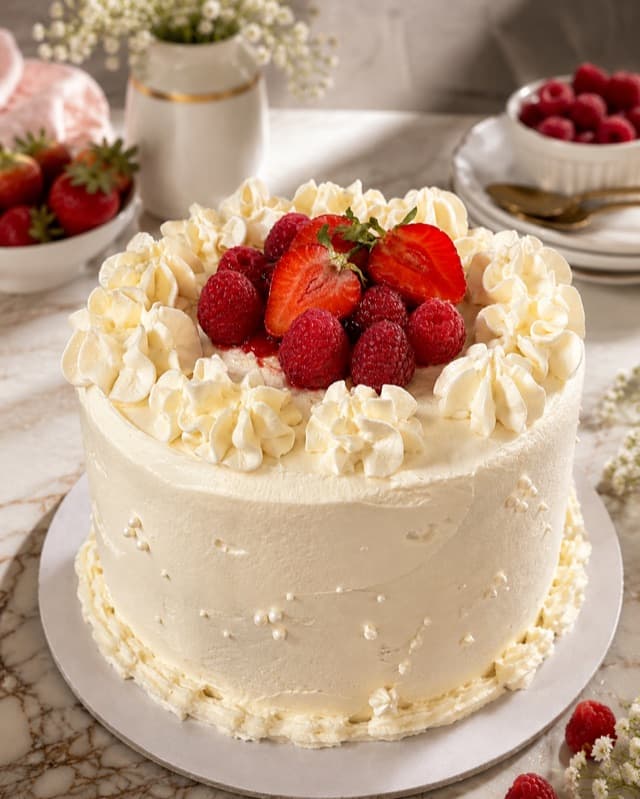
A fruit cake for your next birthday 🍓 This creation combines [confirmed flavours] and [description of your decoration]. The pictured design serves [number]. From €[price] for [what is included], depending on size and personalisation. Collection in [town], made to order with [lead time] notice, subject to availability. Find this cake using the link in my bio. Enter the date, servings and preferred theme in the form. I will then confirm feasibility and price.
Information to check before publishing
You cannot determine a recipe, allergens, servings or storage conditions from an image. Do not let a generated caption invent them. Availability and delivery area must also be confirmed by you.
- Name the creation accurately: layer cake, number cake or wedding cake, as appropriate.
- Explain which size an advertised price covers and what could change it.
- State your town, collection or delivery options and ordering lead time.
- Ask for the date, guest count and occasion so you can give a useful answer.
- Present the form or private message as an enquiry to confirm, not an already accepted order.
Plan a week around your real creations
Reuse one creation from several angles: present it, show a decorating step, then explain personalisation options. Choose a pace your studio can maintain.
Ambrosia's content ideas and calendar help prepare this sequence. Monthly ideas use 2 credits; a post from a photo uses 1. See pricing to combine different uses.
Write a clear bakery Instagram bio
After seeing a post, a customer may visit your profile to check where you work and how to contact you. Your introduction should complement the caption: your speciality, town and the next step.
Choose a primary contact channel you actually check. If you link to a form or website, make sure it leads directly to the information needed to enquire about a cake.
Personalised cakes · [town] Birthdays & weddings, made to order Designs and order enquiries at the link below
Give your post a next step with your ordering website
Add your Ambrosia website link to your Instagram bio or share it on WhatsApp after a recommendation. Visitors browse the catalogue, open the cake page and fill in its form: date, servings, flavour, theme or inspiration photo, according to your questions.
Create your website for free from business details, Instagram or photos, with a preview before signing up. Then manage its content, products, forms and enquiries in the same space as your posts. Confirm each enquiry with the customer; features and limits depend on your plan. Our team remains available to help.
Assess enquiries instead of promising orders
Record the relevant post, messages received, complete quote enquiries and orders you actually confirm. Ask customers how they found you if the source is unclear.
Ambrosia makes content preparation easier. Views, enquiries and orders also depend on your audience, offering, area and availability.
Questions about Instagram for cake designers
What should I put in an Instagram cake caption?
Describe the photographed creation, its confirmed features, personalisation options and your collection or delivery area. Finish with a clear request: send the date, servings and preferred theme.
Should I post every day?
Choose a pace compatible with your studio and available photos. A useful post can present a creation, answer a pricing question or clarify availability. No posting frequency guarantees orders.
Does Ambrosia receive my customers' orders?
Yes, if you use your Ambrosia ordering page. The customer chooses a creation and completes its form; you find the enquiry in your account. Create your page for free with a preview before signing up. Then confirm price and availability with the customer, with no online payment for a simple enquiry. A separate journey enables Stripe payment for fixed-price products available to buy directly, with Ambrosia commission and Stripe fees.